


1.19.50 UPDATE AVAILABLE ON BEDROCK

A Minecraft Bedrock Edition Update


What do you picture when you hear the word “hacker”? Do you see a person standing in front of a rock ready to discover what beautiful statue awaits inside? Perhaps your mind conjures up a writer, ready to make the worst puns you’ve ever read. Or maybe you see cool, wraparound glasses and a floor-length duster. I see a wall that is a mere suggestion, because this hacker is about to walk right through it. And now, you can too because as of today spectator mode is available in Bedrock Edition!
In Minecraft, we’ve abandoned most laws of physics but when you enable spectator mode you are throwing them all out of the window. You can no longer move things or touch anything, if you try your hand will go straight through whatever block you are trying to pick up. Other players or mobs won’t be able to see you unless they too are in spectator mode. Fellow spectators will appear as transparent floating heads, which makes sense since the way you move around Minecraft is by flying.
Now that we’ve listed all the cool things about spectator mode, you are probably asking “Jay, will you be using your new spectator powers for good?” to which I say, “No! I am obviously going to sneak back into all the Realms my colleagues kicked me out of for being too good at pranks. But let’s discuss how you enable spectator mode instead.” In the Settings Menu, you can switch the ‘/gamemode spectator’ command on and off if cheats are enabled. Your inventory, health, and held items will remain unchanged when you go in and out of spectator mode. That’s all there is to it!
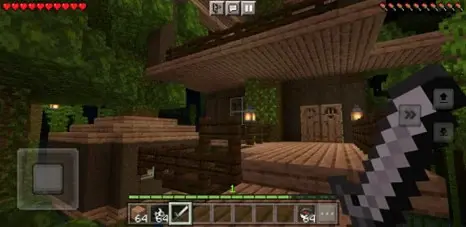
But wait! That’s not all we have in store for you today. Touch controls are now available for everyone. They won’t be behind a toggle anymore, and when you launch Minecraft on a mobile device you will find a Touch Controls Video Onboarding screen under Settings. If you’ve never used the new controls, this video will play automatically the first time that you enter a world.
So, what are you going to do first? Fly through Minecraft in spectator mode without touching anything, or go in the opposite direction and navigate the Overworld with touch controls. I am going to try to do both at once! Check out the full changelog of updates and have fun spectating in your own world!
NEW FEATURES:
SPECTATOR MODE
Spectator Mode has made its way into Minecraft: Bedrock Edition! This feature has been experimental for a little while but has now made its way into the game with no experimental toggle required. Here’s a quick write up of this new game mode and how it can be used:
When cheats are enabled, players can go in and out of Spectator Mode using the Personal Game Mode option in World Settings or the '/gamemode spectator' command
Spectators have a reduced HUD that does not show the crosshair, hotbar, XP, health, hunger, or armor
Players’ inventory, health, held items, etc, are unchanged when switching in and out of Spectator Mode
Spectators are always flying and cannot be grounded
Spectators pass through solid blocks and entities without collision
Spectators can see out of solid objects when inside blocks
Spectators cannot take damage and are not affected by any blocks, mobs, items, portals, or effects
Spectators cannot use items or interact with blocks or mobs
Spectators cannot open their inventory or interact with block screens, like Chests or Furnaces
Spectators cannot be seen by mobs or other players, except other players in Spectator Mode
Spectators appear as a transparent floating head to other players in Spectator Mode
Spectators are not needed to sleep to pass the night
When playing in first person perspective, spectators do not see their arm or held item
Spectators generate chunks, if they fly to new chunks
Spectators do not spawn any mobs
Non-persistent mobs around spectators will check for distance to any non-spectators when deciding if they should despawn
Commands can select and act on spectators
A list of fixes since the last release can be found below in the Vanilla Parity section below.
New Touch Controls
New touch controls are now enabled on touch devices by default
Players can choose between "Joystick & tap to interact", "Joystick & aim crosshair", or "D-Pad & tap to interact"
New Default Skins
New characters have joined Steve and Alex! These character skins can be selected in the Dressing Room

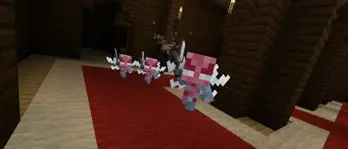
Vex
Updated the model and texture of the Vex
The Vex retains a slightly larger hitbox to make it easier to fight
Vanilla Parity: Mobs
While playing tag, baby Villagers will now run at a quicker speed that matches Java Edition
Blocks
Wooden Doors, Iron Doors, Wooden Trapdoors, Iron Trapdoors, and Fence Gates now use the same opening and closing sound effects as Java Edition
Updated Pressure Plates to have different pitches based on their behaviour to match Java Edition
Added unique button click sound for Wooden Buttons to match Java Edition
Crimson and Warped block sets now have a unique set of sounds
Chiseled and Cut Red Sandstone now have smooth undersides (MCPE-20006)
Projectiles landing on Mud will no longer shake repeatedly (MCPE-153744)
Amphibious mobs no longer have trouble pathfinding around Mud Blocks (MCPE-153961)
Mud and Soul Sand Block bounding boxes now matches their visual bounding boxes for when a player places the blocks (MCPE-162252)
Lily Pads now pop with sound and particles when run into by a Boat (MCPE-65138)
Most blocks destroyed from lack of support now have visual particles, audio effects, and cause vibration events
Coral Fans can no longer be placed on the side of Slab blocks (MCPE-116986)
Coral Fans can now survive on top of solid transparent blocks like Glass (MCPE-112407)
Fixed a bug where placed Light Blocks were invisible even while selecting a Light Block
Spectator Mode
Open container, Command Block, or Structure Block screens now close when players enter Spectator Mode
Spectator Mode now appears on the list of Personal Game Modes in Settings (MCPE-156688)
Allays no longer throw items to spectators (MCPE-162873)
Experimental Features:
Introducing the next major update experimental toggle! Enable the “Next Major Update” toggle in world settings to enable this content
These features are a work in progress and are still in active development. The design and functionality of these features will likely change before they’re released
Please remember: Worlds that have used experimental toggles will always be flagged as “Experimental”. We recommend keeping these experimental worlds as separate copies from your main saves. More information can be found in this article
Bamboo Wood Blocks
Added the Bamboo family of blocks as a wood type and use for Bamboo
Added Bamboo Raft
Camel
Added Camels, which can spawn in desert villages
Two players can ride Camels together
Camels are tall animals and riders are high enough off the ground, out of range from mob melee attacks
Camels can walk and sprint, or dash with a short burst of speed
Camels randomly sit down for short periods of time and flick their ears about
Chiseled Bookshelf
A new, chiseled variation of the Bookshelf
Can store Books, Book and Quills, and Enchanted Books
Holds up to 6 Books. Keeps the stories and lore of your world safe
Comparators can detect the last book placed/removed. Perfect for hiding secrets in your spooky library
Hanging Sign
A new type of Sign that can be placed beneath and on the side of blocks
Hanging Signs are available for all wood types
Hanging Signs can also be placed under narrow blocks with center support, like Fences
Fixes: Stability / Performance
Fixed several crashes that could occur during gameplay
Fixed a crash that could occur when navigating down in the Villager screen with the keyboard
Fixed an issue where game would crash when Ender Dragon breath attack hadn't hit blocks or fell into the void (MCPE-161204)
Navigating through the Recipe Book when the player had items that contain mobs in their inventory (like Bees in Beehives) no longer causes significant drops in performance (MCPE-146462)
Reduced server lag with items going in and out of Hoppers (MCPE-68796)
Fixed frame rate dropping when hovering over item slots on the Creative inventory screen (MCPE-162277)
Fixed a crash that would occur if Education Edition items were rendered without the Education Edition toggle turned on (MCPE-161587)
Fixed a crash that could occur when actors with a non-player owner went through End Portals
Fixed a crash that could occur when loading into some Marketplace worlds on low memory devices (MCPE-161866)
Gameplay
When stuck inside a block, players will now be pushed towards the nearest open area
Maps corrupted by black pixels can now be repaired by revisiting corrupted areas. Previously affected maps can now be repaired by holding in main or off hand (MCPE-162421)
Fixed a bug that could cause the player to teleport back to a portal after exiting it (MCPE-157494)
Fixed a bug that could cause players to get stuck on the "Building Terrain" screen when changing dimensions (MCPE-158215)
Fixed improper LevelChunk blending when upgrading pre-1.18 worlds (MCPE-162480)
Fixed Xbox controller thumbstick deadzone and sensitivity (MCPE-162847)
Mobs
Increased Enderman follow range from 32 to 64 (MCPE-35306)
Jump Boost now consistently affects mobs ridden by players (MCPE-45823)
Slow Falling now consistently affects mobs ridden by players (MCPE-126604)
Fixed an issue where breeding mobs with applied effects would result in the offspring having the effect bonuses permanently applied (MCPE-81890)
Fixed Bat resting location being offset when at negative world height
Armor Stands now drop their offhand item upon destruction (MCPE-158228)
Fixed a bug that caused the Ender Dragon to not load if the world was saved and loaded while it was alive (MCPE-156528)
Blocks
Dirt Path and Farmland collision are now one pixel lower (MCPE-12109)
Players now sink in Soul Sand and Mud blocks (MCPE-154973)
Sugar Cane will now break on next random tick when its water source is removed (MCPE-162351)
Piston arms now extend more smoothly (MCPE-155987)
Blocks attached to Pistons now move more smoothly (MCPE-146597)
Huge Fungus blocks will no longer replace partial blocks when growing from Nylium (MCPE-65661)
Fixed an issue where an entity at coordinate 0,0,0 prevented Pressure Plates from being placed (MCPE-161377)
Fixed blocks flickering when moved by Pistons (MCPE-15268)
Fixed an issue where signs would not play a placement sound when placed (MCPE-65423)
Bubble columns are now properly generated above underwater Magma Blocks
Swimming above Mud blocks no longer causes the screen to get blocked (MCPE-153737)
Items
Freshly crafted tools and armor now work the first time they are used (MCPE-161151)
Weapons, tools, and armor can now be dropped from the players inventory the first time after being renamed (MCPE-162132)
Fixed issues with Book & Quill not able to be signed and closed (MCPE-163325)
Fixed a bug where fully charged items were lost when going through a portal (MCPE-55279)
Using the Anvil to enchant or fix items will no longer rename items unintentionally (MCPE-154453)
Fixed a bug where Slimes and Magma Cubes could break Shield durability every tick (MCPE-119451)
Fixed a bug where Pufferfish could break Shield durability every tick (MCPE-143689)
Touch Controls
Re-enabled the new stack splitting functionality for touch devices
"Split Control" option will only appear in Classic control mode and only affect the Classic control scheme
Fixed an issue where hotbar slots could not be touched in Crosshair and Touch control schemes in certain situations
Scrolling the inventory screen is easier as the dwell time has been increased to 180 milliseconds (was 120 previously). The dwell time is the length of time an item must be held before a drag action begins
Untangled the connections between "Lock Joystick", "Joystick Always Visible", and "Joystick Visible When Unused"
Added toggle "Delayed Block Breaking (Creative Only)" in Touch Settings to control this functionality
Fixed an issue where double tapping touch control buttons can be difficult on high refresh rate screens (MCPE-156351)
Improved the way that button presses and camera movements work in tandem in the new Touch Controls
Action buttons now show up when in a Boat while using Crosshair mode (MCPE-159376)
Fixed the Dismount button in the new touch control schemes appearing blurry (MCPE-156722)
Fixed an issue which prevented items from being discarded in the extended Creative Mode inventory by dropping them on another item (MCPE-162124)
Fixed an issue with touch controls when swimming and charging a Bow, Crossbow, or Trident no longer launch the weapon immediately (MCPE-136625)
Fixed an issue where joystick gestures were stopped if your finger overlapped with the hotbar (MCPE-159870)
Resolved an issue where players couldn't interact with the hotbar in some resource packs with the new touch controls (MCPE-157748)
The sprint and descend buttons in Crosshair Mode now have the same colour as other buttons (MCPE-156740)
Resolved an issue where quickly tapping "Ascend" and "Descend" would cancel flying in the new touch controls. Going forward, double tapping "Descend" is how flying is cancelled (MCPE-162240)
Status icons now follow the screen safe zone when in touch mode
Adjusted status icons to form in one row across width of screen when in touch to account for new touch controls
Removed the action delay from Attack and Interact buttons (MCPE-158143)
When the joystick is unlocked, the draggable range has been changed to be the same as the when the joystick is locked. In both modes, if auto-sprinting is enabled, it will start when the joystick is dragged slightly above the background. The auto-sprint will disengage if the joystick control is subsequently moved back into the joystick background area
A tap gesture will now fire a charged Crossbow. Previously, it was necessary to hold the gesture for 400ms before the bolt would fire
Fixed an issue where players couldn't drag/drop on the Anvil screen
Graphical
Applied ambient light to blocks moved by Pistons (MCPE-136928)
Mob shadows now render properly on Android devices using certain GPUs (MCPE-155354)
Added D3D12 support for Intel Integrated/Dedicated Graphics for compatible drivers
Realms
Shortened text when uploading worlds and add-ons so it fits in the dialog prompt
You will no longer get an error message when joining a Realm that has been empty for several minutes
User Interface
Added a new Mobile Data Blocked screen on Android/iOS when mobile data is available but disabled in-game and Wi-Fi is not connected
Players can now rebind the copy coordinate keys with Full Keyboard Gameplay and the Enable Copy Coordinate UI settings enabled (MCPE-163082)
Fixed a bug where the boss bar name would not update when the boss name changed until the bar was reloaded by the player (MCM-1100)
Fixed a bug on the Pocket UI Inventory screen where items could not be dropped back into the inventory in Creative Mode
Fixed a bug on the Pocket UI Inventory screen where the ‘Craftable/All’ toggle could only be changed in the Search tab but not in any other tab
On Xbox, camera movement with mouse no longer changes mouse position when the inventory screen is reopened (MCPE-162890)
Text color for a selected item stack count is now white instead of yellow
A warning now appears when the player is about to lose changes when moving away from the Create New World screen
Changed the error handling of copying worlds to display a modal pop-up instead of a toast notification
Fixed a bug causing the HUD to not rotate with the player's direction while riding in a Boat in VR
Changed the color of the description text for the “Allow mobile data for online play” option to be more readable (MCPE-162459)
Fixed a contrast issue of the little arrow in dropdown components on hover, the unselected toggle components and the toggle/sliders in chat settings
Technical Updates: Updated Add-On Template Packs
Updated Add-On templates for19.50 with new resources, behaviors, and documentation are available to download at aka.ms/MCAddonPacks
Structure Block Import
Structure Blocks can now import structures from ‘.mcstructure’ files on Windows
General
Actor (Entity) Properties are no longer experimental (This includes Molang queries and property filters, but not Permutations)
Fixed a crash that would occur if the texture_index of a spawn egg was out of bounds. Now a content log error will be presented instead
Min/Max distance values in sound events now only affect the sound event and not all events using the same sound (MCPE-154376)
Added client-side-chunk-generation-enabled toggle to server.properties
Fixed an issue where changing the subpack of Resource Packs that have subpacks would not apply changes until the game was restarted (MCPE-162002)
Recipes that have the same inputs but have different outputs will now display content errors (excludes Crafting Table and Stonecutter recipes)
New ‘/execute’ Command Syntax
Removed the Upcoming Creator Features requirement for the new execute command syntax
Version 1.19.50 is now required to run the new command syntax
Creators currently using the new execute command syntax in command blocks will have to go modify those command blocks in order to update those commands
Creators currently using the new execute command in behavior packs will need to change the min engine version to 1.19.50
The previous execute command syntax can still be used by using version 1.19.40 or less
Commands
Using the '/enchant' command to apply the same level of enchantment no longer results in a higher level being applied (MCPE-153204)
Fixed an issue where hasItem wouldn't correctly detect an item with a data value if hasItem wasn't provided a data value (MCPE-162460)
Running '/execute as' from Command Blocks no longer inherits rotation from entity (MCPE-162680)
Fixed a bug where Chain Command Blocks would not activate when Delay in Ticks was greater than 0
Running ‘/execute align xyz entity’ now produces a command error instead of crashing (MCPE-162733)
Data-Driven Blocks
Released BlockCollisionBoxComponent outside of experimental toggle in JSON formats 1.19.50 and higher
Released BlockCraftingTableComponent outside of experimental toggle in JSON formats 1.19.50 and higher
The Crafting Table UI now updates when a block changes to a permutation with a different “minecraft:crafting_table” block component
Removed the functionality of the “minecraft:breathability” block component. Component will have no effect on the custom defined block
Data-Driven Items
Blocks using the "minecraft:placement_filter" component now produce particles, sounds and vibrations events when they are removed due to their placement condition failing
Mobs
"input_ground_controlled" no longer implies increased auto step when controlled by player. The "variable_max_auto_step" component can be used instead. To have consistency with previous versions, use "base_value": 1.0625 and "jump_prevented_value": 0.5625
Networking
Added server property 'enable-lan-visibility' to disable the explicit LAN discovery by clients. This will prevent unexpected port conflicts when running multiple dedicated servers on a single host. Clarified port use in server logs and made error messaging more clear (BDS-1094)
AI Goals
Exposed new data parameters for the "minecraft:offer_flower" AI behaviour to specify such things as the time that the mob offers the flower for, the chance that the goal will start, and the dimensions of the AABB used to search for a mob to offer a flower to
The "minecraft:offer_flower" AI behavior can now be used by any mob, not just the Iron Golem
The "minecraft:offer_flower" AI behavior will now search through all mobs in the specified range rather than just the closest one, meaning that this goal has the potential to be used more consistently than before
Exposed new data parameters for the "minecraft:take_flower" AI behavior to specify such things as the conditions to be met to start the goal, the min and max wait times before taking the flower, and the dimensions of the AABB used to search for a mob to take a flower from
The "minecraft:take_flower" AI behavior can now be used by any mob, not just baby Villagers
Molang
Fixed has_property to return 1 when a property exists and 0 when not, rather than the opposite of that
Scripting, APIs, and GameTest Framework (Experimental)
Fixed velocity property not returning correct values in certain situations (MCPE-152715)
Added function canPlace - Returns if it is valid to place the desired block type or block permutation at a specified location (and optional face of the block)
Added function trySetPermutation - Attempts to place the desired block permutation at a location by first checking canPlace
Entity
Removed function runCommand. Consider runCommandAsync as an alternative
Dimension
Removed function runCommand. Consider runCommandAsync as an alternative
Converted BlockRaycastOptions to an interface
Converted EntityEventOptions to an interface
Converted ScoreboardObjectiveDisplayOptions to an interface
Location type updated to IVec3
Vector
add - updated aand b arguments to accept an IVec3 interface type
cross - updated aand b arguments to accept an IVec3 interface type
distance - updated aand b arguments to accept an IVec3 interface type
divide - updated aargument to accept an IVec3 interface type
lerp - updated aand b arguments to accept an IVec3 interface type
max - updated aand b arguments to accept an IVec3 interface type
min - updated aand b arguments to accept an IVec3 interface type
multiply - updated aargument to accept an IVec3 interface type
slerp - updated aand b arguments to accept an IVec3 interface type
subtract - updated aand b arguments to accept an IVec3 interface type
API
Initial APIs are releasing out of beta and will be usable without an experimental flag
The first module to release is @minecraft/server as version 1.0.0. The APIs included with this are listed below:
Non-beta APIs like those included in the @minecraft/server0.0 module do not require the Beta APIs experiment to be turned on, and will be more stable over time
This initial API set is narrow, but we intend to add more APIs into non-beta modules over the coming months
@minecraft/server will continue to develop in Beta and those Beta APIs have been incremented in version to 1.1.0-beta; if you wish to continue to use Beta @minecraft/server APIs, manifest.json references will need to be updated to 1.1.0-beta
APIs included in the @minecraft/server version 1.0.0 release:
System type (Exposed via systemglobal instance)
run() - runs a function on the next tick (can be used to maintain a game loop tick over tick)
World type (exposed via worldglobal instance)
getDimension()
getAllPlayers()
MinecraftDimensionTypes type
nether
overworld
theEnd
Dimension type
id
runCommandAsync()
CommandResult type
commandResult
Entity type
id
typeId
dimension
runCommandAsync()
Player type
name

Author: Jay Wells Published: 11.29.22
(Unlock 2x the $ value in Emerald Points)

Exclusively

From the General's Desk...
A wonderful surprise today, folks! We have a new Minecraft Bedrock Update...
The change-log is quite extensive, so be sure to read it all above. some of the awesome things in it are Parity changes to bring Bedrock more in alignment with Java edition. They have also included some of the new feature being added to Minecraft 1.20, including changes to mobile touch UI. Of course there are some bug squashes and the like. One of the things I noticed in this latest Bedrock update in that the Mojang developers have added a light effect on all blocks that are moved by a piston. I cant wait to see what this looks like.
some of the mot recent talked about changes have also arrived today for Minecraft Bedrock, including Spectator Mode, changes in the Vex, and the introduction of new default player skins.
As always, be sure to comment below any bugs you may still be experiencing, and report them to Mojang HERE:

Please share your thought down below in the Comments Section.
- MMG
"Keep It Sharp!"


Comments